Bald filter
See yourself with a shaved head. Add your photo and keep the details you like.
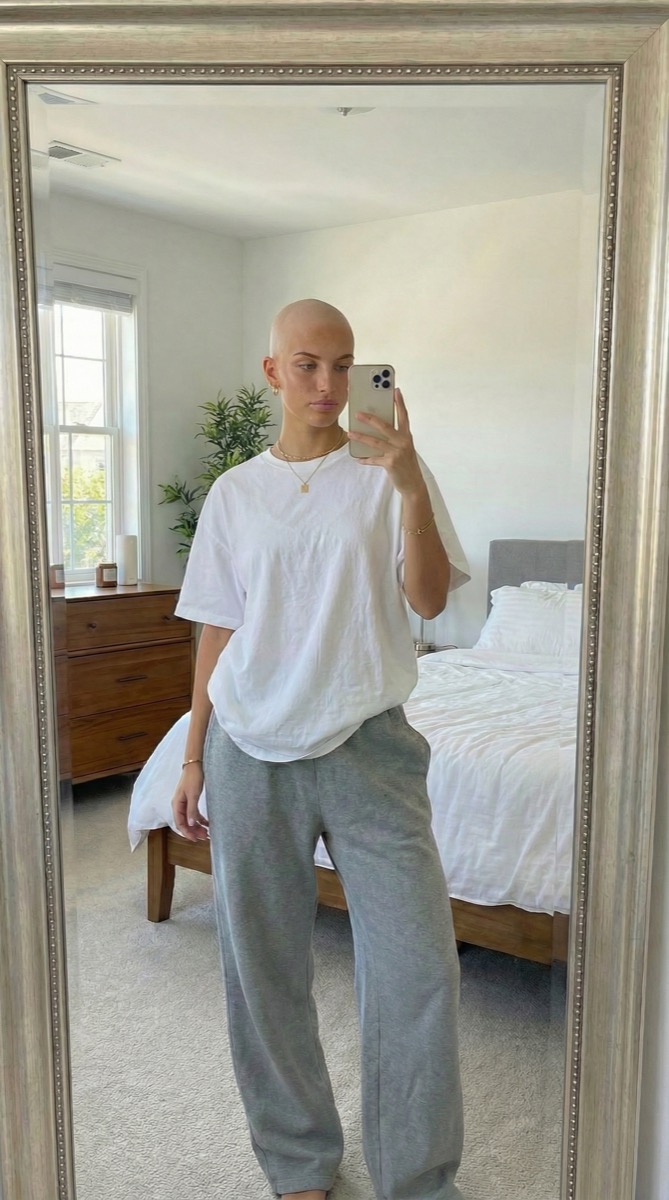
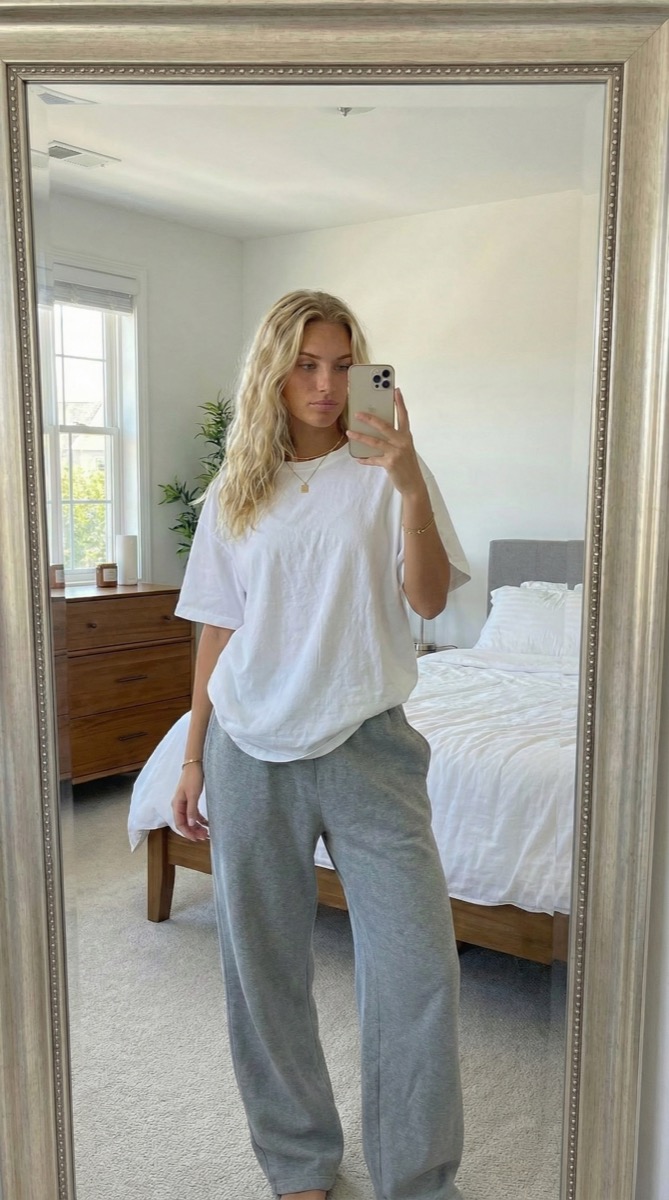
Try it on your photo
How to try a bald filter on your photo
Add your photo
Choose a portrait with your whole head in the frame. A selfie or a photo taken by a friend works well.
Make it your own
The bald effect is already selected. Add an instruction if you want to keep your beard, glasses or another detail.
Give me a shaved head. Keep my face and beard the same.

Generate your photo
Compare your shaved-head look with the original. Download the result or share it straight from your phone.
BeforeAfter
See the shaved-head look on your own face.
Try a shaved head on a familiar photo. Keep your beard, expression and the scene, and see how a different hairstyle changes the look.
See yourself with a shaved head
Compare the shaved-head look with your current hairstyle before deciding whether to reach for the clippers.
Make a playful photo edit
Send your new look to the group chat, or swap photos with a friend and see who suits a shaved head.
Keep the details that matter
Ask to keep your beard or glasses. A well-lit photo with one visible face gives the model a clearer starting point.
Choose a photo with a clear view of your head.
Keep your head in the frame
Leave room around the top and sides of your head. A cropped hairline makes the missing shape harder to reconstruct.
Use even light
Choose a sharp photo without a hat or strong shadows. Hair covering the forehead or face can change the result.
Try another angle
Compare a straight-on selfie with a three-quarter portrait to see the shaved-head look from a different angle.
Keep the details you like.
Keep my beard, glasses and expression the same. Leave the background unchanged.
Questions about the bald filter?
Need something else? Contact us.
Upload a clear portrait to this bald filter, add any instructions and press Generate Image. Sign in and choose a paid plan to generate. Your photo and instructions carry into the matching editor.
No. Choosing a photo and writing instructions does not cost anything, but generating a photo requires a paid plan. Eligible new customers can start with 40 images for $0.99 for three days. Weekly then renews at $6.99 per week; yearly renews at $59.99 per year with 100 images released monthly. Cancel future renewals in settings.
Yes. The tool runs in your browser. Add Your Photo opens your device’s native picker, which may offer your photo library, files or camera depending on your device and browser.
The effect aims to keep your face recognizable. Add an instruction to keep your beard or glasses. AI can still change details, so the result is a visual approximation.
You can try it with long hair. Hair across the face, shoulders or background gives the model more to reconstruct and can make the result less consistent.
No. TooExtra edits a still photo. If your device offers a camera option in the picker, you can take a photo first and then edit it.
The selected photo is prepared and saved in this browser while you sign in or visit checkout. It is not sent to the AI service until you have access and press Generate Image in the app. Use the same browser and tab to keep your draft.